
A customer asked me if there was a quick way to check the backup configuration for all of the VM instances within their OCI tenancy because they needed to ensure that all Boot Volumes had a Backup Policy applied ✅.
I created a PowerShell script for them (they are primarily a Windows shop) that does just that for them!
This script does the following
- Loops through each Compartment within the tenancy and identifies the Boot Volumes within the compartment.
- For each Boot Volume it identifies, checks if there is a Backup Policy assigned, if there is a policy assigned outputs the name of the policy otherwise report NONE
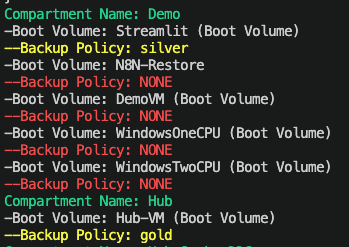
Here is the output of the script from my test tenancy, you can clearly see that I’m being naughty here and only have backup policies assigned for 2 of my 6 VM instances ⛔️.
Here is the script in all its glory! Before running it, update CompartmentId with the OCID of the root compartment within the tenancy.
# Get all Compartments$Compartments = Get-OCIIdentityCompartmentsList -CompartmentId "ocid1.tenancy.oc1..aaaaaaaae" -CompartmentIdInSubtree $true -LifecycleState Active# Loop through each Compartment, identify each VM boot volume and output the assigned backup policyForeach ($Compartment in $Compartments) {Write-Host "Compartment Name:" $Compartment.Name -ForegroundColor Green$BootVolumes = Get-OCIBlockstorageBootVolumesList -CompartmentId $Compartment.IdForeach ($BootVolume in $BootVolumes) { Write-Host "-Boot Volume:" $BootVolume.DisplayName $PolicyAssignment = Get-OCIBlockstorageVolumeBackupPolicyAssetAssignment -AssetId ($BootVolume.Id) if ($PolicyAssignment) { $Policy = Get-OCIBlockstorageVolumeBackupPolicy -PolicyId ($PolicyAssignment.PolicyId) Write-Host "--Backup Policy:" $Policy.DisplayName -ForegroundColor Yellow} else { Write-Host "--Backup Policy: NONE" -ForegroundColor Red } }}
The script is also available on GitHub.
If you need a hand using PowerShell with OCI, check out this guide.


Leave a Reply