
I’ve been working on a project deploying an OCI Generative AI Agent 🤖, which I’ve previously spoken about here 📼.
Marketing blurb – OCI Generative AI Agents is a fully managed service that combines the power of large language models (LLMs) with AI technologies to create intelligent virtual agents that can provide personalized, context-aware, and highly engaging customer experiences.
When creating a Knowledge Base for the agent to use, the only file types that are supported (at present) are PDF and text files. I had a customer that needed to add Word documents (DOCX format) to the agent, rather than converting these manually which would have taken a lifetime 🕣, I whipped up a Python script that uses the docx2pdf package – https://pypi.org/project/docx2pdf/ to perform a batch conversion of DOCX files to PDF, one thing to note is that the machine that runs the script needs Word installing locally.
Here is the script 👇
import os
import docx2pdf # install using "pip install docx2pdf" prior to running the script
os.chdir("/Users/bkgriffi/Downloads") # the directory that contains the folders for the source (DOCX) and destination (PDF) files
def convert_docx_to_pdf(docx_folder, pdf_folder): # function that performs the conversion
    for filename in os.listdir(docx_folder):
        if filename.endswith(".docx"):
            docx_path = os.path.join(docx_folder, filename)
            pdf_filename = filename[:-5] + ".pdf"
            pdf_path = os.path.join(pdf_folder, pdf_filename)
            try:
                docx2pdf.convert(docx_path, pdf_path)
                print(f"Converted: {filename} to {pdf_filename}")
            except Exception as e:
                print(f"Error converting {filename}: {e}")
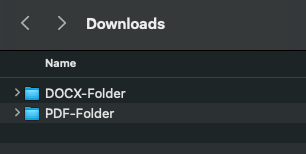
convert_docx_to_pdf("DOCX-Folder", "PDF-Folder") # calling the function, with a source folder named DOCX-Folder and a destination folder named PDF-Folder, these folders should reside in the directory specified in line 4
Folder structure 🗂️
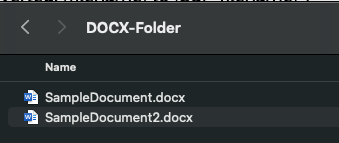
Source DOCX files 📄
Script Running 🏃

Output PDF files

Once the documents have been converted to PDF format they could be added to an OCI Storage Bucket and ingested into the OCI Generative AI Agent.


Leave a Reply