Tag: programming

  • Error building a container when using the OCI Cloud Shell πŸ«™

    This afternoon I was using the OCI Cloud Shell to build a container to be pushed to the OCI Container Registry which I was then going to create an OCI Container Instance from. This is something that I’ve done countless times without any issues, as I was short of time (I’m going on holiday tomorrow) as is typical, anything that could go wrong, did 😭.

    When running the following command from the OCI Cloud Shell to build the container.

    docker build --tag container-name .
    

    It returned the following error (interesting bits in bold).

    Error: committing container for step {Env:[PATH=/usr/local/bin:/usr/local/sbin:/usr/local/bin:/usr/sbin:/usr/bin:/sbin:/bin LANG=C.UTF-8 GPG_KEY=E3FF2839C048B25C084DEBE995E310250568 PYTHON_VERSION=3.9.21 PYTHON_SHA256=3126f59592c9b0d7955f2bf7b081fa1ca35ce7a6fea980108d752a05bb1] Command:run Args:[pip3 install -r requirements.txt] Flags:[] Attrs:map[] Message:RUN pip3 install -r requirements.txt Heredocs:[] Original:RUN pip3 install -r requirements.txt}: copying layers and metadata for container “4aa0c966251fa75dac10afc257b8c8d62aae50c45eb5dd1157d3c1cae0208413”: writing blob: adding layer with blob “sha256:5699f359aa00daa8a93b831b478fea1fe7c339396e532f13e859fb4ef92fd83f”: processing tar file(open /usr/local/lib/python3.9/site-packages/oci/addons/adk/__pycache__/agent_client.cpython-39.pyc: no space left on device): exit status 1

    After much Googling (without much luck I may add!) I had a brainwave – the OCI Cloud Console only provides 5GB storage as per the documentation – perhaps I’d hit the storage limit πŸ€”:

    It turned out that the majority of the storage consumed was by Docker / Podman (as a side note the Cloud Shell now uses Podman, however the Docker commands are aliased to it, so you can continue to use them).

    So……it looked like I needed to do some housekeeping 🧹.

    To identify the storage used by Docker / Podman, you can run the following command:

    docker system df
    

    Which returned the following:

    To free up some space I ran the following command (which is a little brute force, I may add πŸ”¨):

    docker system prune -a
    

    Using my YOLO approach, I selected y to continue which worked its magic and free’d up some space (please take heed of the warnings ⚠️).

    I then had plenty of free space and could build the container successfully βœ…

    I can now enjoy my holiday, safe in the knowledge that I managed to fix this issue πŸ—ΊοΈ.

  • Batch Converting Word Documents to PDF using Python πŸ

    I’ve been working on a project deploying an OCI Generative AI Agent πŸ€–, which I’ve previously spoken about here πŸ“Ό.

    Marketing blurbOCI Generative AI Agents is a fully managed service that combines the power of large language models (LLMs) with AI technologies to create intelligent virtual agents that can provide personalized, context-aware, and highly engaging customer experiences.

    When creating a Knowledge Base for the agent to use, the only file types that are supported (at present) are PDF and text files. I had a customer that needed to add Word documents (DOCX format) to the agent, rather than converting these manually which would have taken a lifetime πŸ•£, I whipped up a Python script that uses the docx2pdf package – https://pypi.org/project/docx2pdf/ to perform a batch conversion of DOCX files to PDF, one thing to note is that the machine that runs the script needs Word installing locally.

    Here is the script πŸ‘‡

    import os
    import docx2pdf # install using "pip install docx2pdf" prior to running the script
    os.chdir("/Users/bkgriffi/Downloads") # the directory that contains the folders for the source (DOCX) and destination (PDF) files
    def convert_docx_to_pdf(docx_folder, pdf_folder): # function that performs the conversion
        for filename in os.listdir(docx_folder):
            if filename.endswith(".docx"):
                docx_path = os.path.join(docx_folder, filename)
                pdf_filename = filename[:-5] + ".pdf"
                pdf_path = os.path.join(pdf_folder, pdf_filename)
                try:
                    docx2pdf.convert(docx_path, pdf_path)
                    print(f"Converted: {filename} to {pdf_filename}")
                except Exception as e:
                    print(f"Error converting {filename}: {e}")
    convert_docx_to_pdf("DOCX-Folder", "PDF-Folder") # calling the function, with a source folder named DOCX-Folder and a destination folder named PDF-Folder, these folders should reside in the directory specified in line 4
    

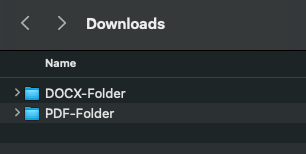
    Folder structure πŸ—‚οΈ

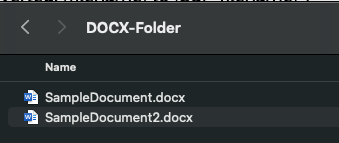
    Source DOCX files πŸ“„

    Script Running πŸƒ

    Output PDF files

    Once the documents have been converted to PDF format they could be added to an OCI Storage Bucket and ingested into the OCI Generative AI Agent.

  • Unable to create a container instance in OCI

    I was working with a customer to deploy a Docker image that I’d added to their OCI Container Registry, however when provisioning a Container Instance using this image it was failing with the following error πŸ›‘:

    A container image provided is not compatible with the processor architecture of the shape selected for the container instance.

    This is a pretty descriptive error message, that you will receive when attempting to deploy a container on a host machine that has a different CPU architecture than that of the image you are attempting to deploy, for example trying to deploy a container that uses an x64 based image to a host machine that has an ARM CPU.

    In this specific case, I was attempting to deploy a container to a AMD x64 machine – something which I had done numerous times successfully with this very image – a real case of “it works on my machine!“. After much head scratching I figured out what I’d done wrong πŸ’‘.

    I had used the Cloud Shell to create the image and deploy to the Container Registry (I ❀️ the Cloud Shell!).

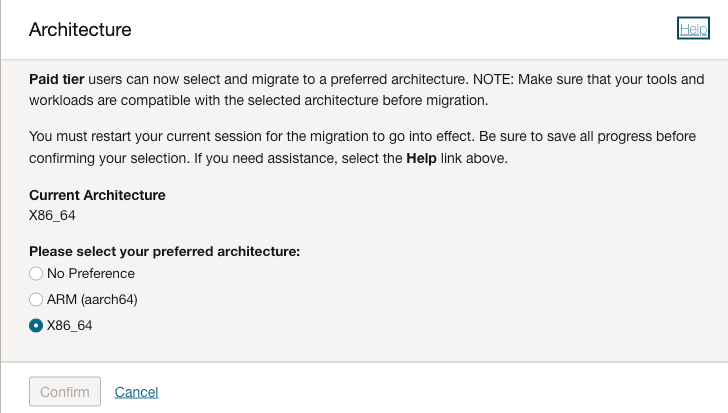
    It turns out that it’s possible to select the arcihtecture to use for the Cloud Shell, I had been using x64 in my tenant, however the admin at the customer had ARM configured for their Cloud Shell therefore when it was building the Docker image it was pulling the ARM version of the base image therefore failing when attempting to deploy this to an AMD x64 host.

    There are two options to fix this:

    1. Provision the Container Instance on an Ampere (ARM) host
    2. Re-create the image using a Cloud Shell with the desired CPU architcture, in this case x64

    I was lazy and opted for option 1, to however to change the CPU architecture for Cloud Shell:

    • Launch Cloud Shell
    • Select Actions > Architecture
    • Choose the desired architecture (this is a per-user setting, not tenant-wide)

    Hope this helps somebody in the future!