Tag: ai

  • Deploying an OCI Landing Zone using Terraform πŸ›©οΈ

    OCI has a number of Terraform based Landing Zone blueprints available.

    The One OE (Operating Entity) OCI LZ blueprint can be deployed to an OCI tenancy directly from GitHub using the “Deploy to OCI” button:
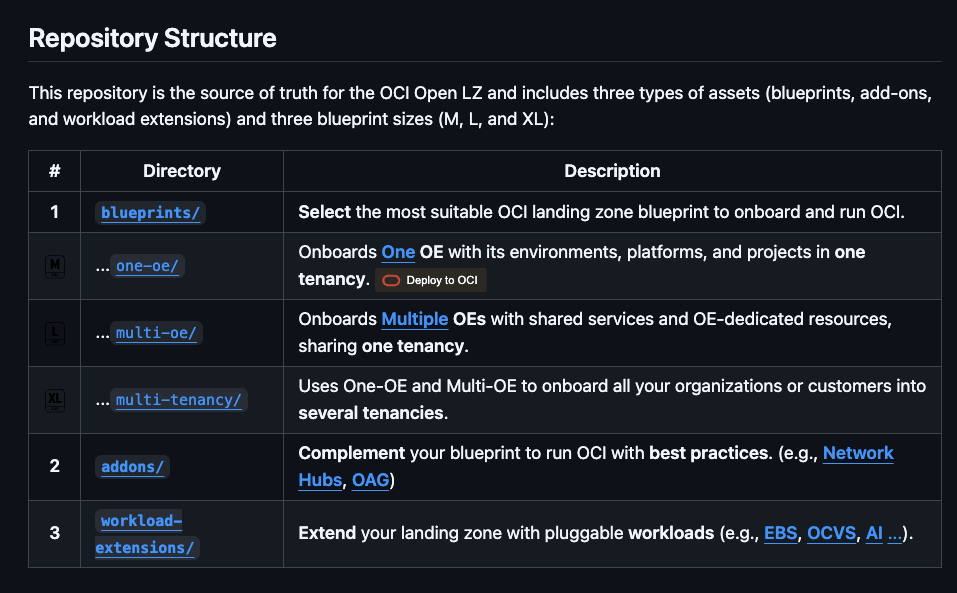
    This then uses OCI Resource Manager to deploy the blueprint to a tenancy – which uses Terraform under the hood.

    I wanted to deploy the One OE blueprint to one of my test tenancies, however I wanted to do this natively using Terraform from my local machine rather than using OCI Resource Manager, mainly due to the additional flexibility and ease of troubleshooting that this approach provides.

    It took me a while to figure out exactly how to do this (with a lot of help from one of the OCI LZ Black Belts πŸ₯‹).

    I’ve documented the process that I followed below, hopefully it saves somebody else some time ⌚️.

    βœ… Step 0Make sure you have Terraform and Git installed (I’m assuming that you already have these installed locally).

    βœ… Step 1 – Create a directory to store the blueprints and configuration

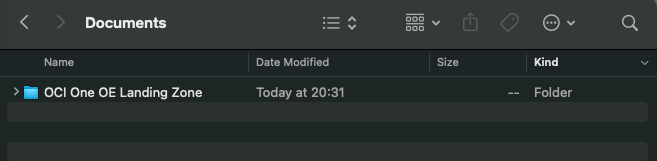
    I created a folder aptly named “OCI One OE Landing Zone

    …then opened a terminal and ran the following commands from within this folder:

    git clone https://github.com/oci-landing-zones/oci-landing-zone-operating-entities.git
    git clone https://github.com/oci-landing-zones/terraform-oci-modules-orchestrator.git

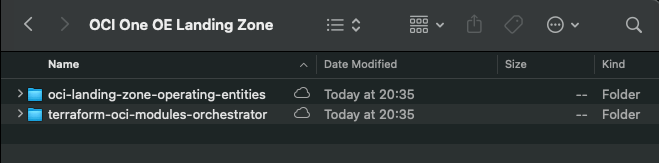
    These commands download the OCI OE Landing Zone blueprints and the Landing Zone Orchestrator.

    Once the downloads have completed, the folder should look something like this:
    βœ… Step 2 – Configure Authentication

    Grab a copy of the file oci-credentials.tfvars.json.template, which is located within the folder OCI One OE Landing Zone/oci-landing-zone-operating-entities/commons/content.

    Take a copy of this file, place it in the root of the OCI One OE Landing Zone folder that you just created and rename the file to oci-credentials.tfvars.json
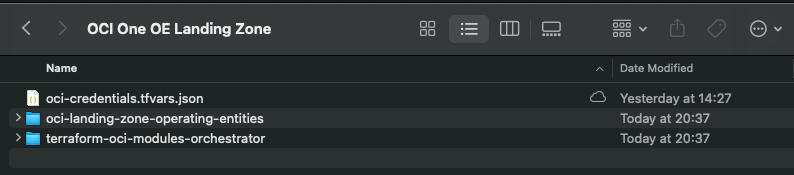
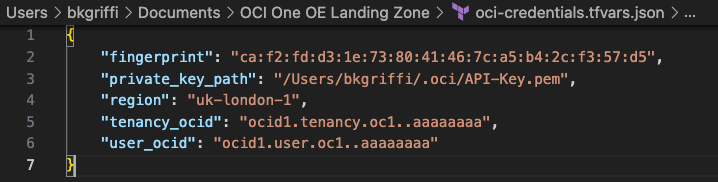
    Open the oci-credentials.tfvars.json file and populate with your authentication information, if you don’t have this please follow the guide here to create an API Signing Key and obtain the other required information.

    Here’s an example of what mine looks like:
    βœ… Step 3 – Grab a copy of the required configuration files

    In order to deploy the One OE Landing Zone, a number of configuration files are required, these can be found within the following folder:

    ‘OCI One OE Landing Zone/oci-landing-zone-operating-entities/blueprints/one-oe/runtime/one-stack’

    • oci_open_lz_one-oe_governance.auto.tfvars.json
    • oci_open_lz_one-oe_iam.auto.tfvars.json
    • oci_open_lz_one-oe_security_cisl1.auto.tfvars.json
    • oci_open_lz_hub_a_network_light.auto.tfvars.js
    • oci_open_lz_one-oe_observability_cisl1.auto.tfvars.json

    Copy these files into the root of the OCI One OE Landing Zone folder – you can leave them in their original location, but by taking a copy this means that you can edit them (if needed) and easy return them to their “vanilla” state by re-copying across from their original location.
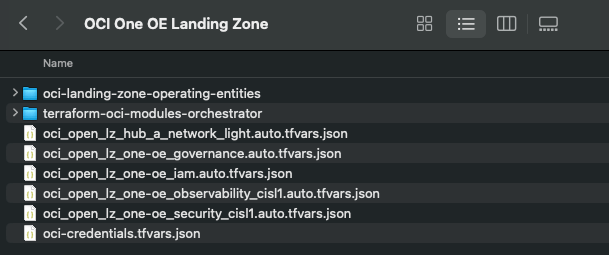
    βœ… Step 4 – Time to deploy πŸš€

    Run the following command from within the OCI One OE Landing Zone/terraform-oci-modules-orchestrator folder to download the required Terraform Providers and Modules

    terraform init

    Once this has completed, run terraform plan (from the same folder), referencing the required configuration files:

    terraform plan \
    -var-file ../oci-credentials.tfvars.json \
    -var-file ../oci_open_lz_one-oe_governance.auto.tfvars.json \
    -var-file ../oci_open_lz_one-oe_iam.auto.tfvars.json \
    -var-file ../oci_open_lz_hub_a_network_light.auto.tfvars.json \
    -var-file ../oci_open_lz_one-oe_security_cisl1.auto.tfvars.json \
    -var-file ../oci_open_lz_one-oe_observability_cisl1.auto.tfvars.json 

    ….if all goes well, you can run terraform apply (from the same folder) using the exact same configuration files.

    terraform apply \
    -var-file ../oci-credentials.tfvars.json \
    -var-file ../oci_open_lz_one-oe_governance.auto.tfvars.json \
    -var-file ../oci_open_lz_one-oe_iam.auto.tfvars.json \
    -var-file ../oci_open_lz_hub_a_network_light.auto.tfvars.json \
    -var-file ../oci_open_lz_one-oe_security_cisl1.auto.tfvars.json \
    -var-file ../oci_open_lz_one-oe_observability_cisl1.auto.tfvars.json 

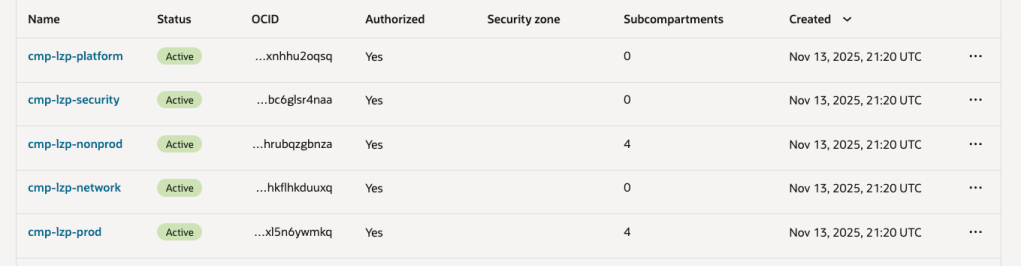
    Within a few minutes, you should (hopefully!) have a beautiful OCI Landing Zone deployed within your tenancy.
  • Error building a container when using the OCI Cloud Shell πŸ«™

    This afternoon I was using the OCI Cloud Shell to build a container to be pushed to the OCI Container Registry which I was then going to create an OCI Container Instance from. This is something that I’ve done countless times without any issues, as I was short of time (I’m going on holiday tomorrow) as is typical, anything that could go wrong, did 😭.

    When running the following command from the OCI Cloud Shell to build the container.

    docker build --tag container-name .
    

    It returned the following error (interesting bits in bold).

    Error: committing container for step {Env:[PATH=/usr/local/bin:/usr/local/sbin:/usr/local/bin:/usr/sbin:/usr/bin:/sbin:/bin LANG=C.UTF-8 GPG_KEY=E3FF2839C048B25C084DEBE995E310250568 PYTHON_VERSION=3.9.21 PYTHON_SHA256=3126f59592c9b0d7955f2bf7b081fa1ca35ce7a6fea980108d752a05bb1] Command:run Args:[pip3 install -r requirements.txt] Flags:[] Attrs:map[] Message:RUN pip3 install -r requirements.txt Heredocs:[] Original:RUN pip3 install -r requirements.txt}: copying layers and metadata for container “4aa0c966251fa75dac10afc257b8c8d62aae50c45eb5dd1157d3c1cae0208413”: writing blob: adding layer with blob “sha256:5699f359aa00daa8a93b831b478fea1fe7c339396e532f13e859fb4ef92fd83f”: processing tar file(open /usr/local/lib/python3.9/site-packages/oci/addons/adk/__pycache__/agent_client.cpython-39.pyc: no space left on device): exit status 1

    After much Googling (without much luck I may add!) I had a brainwave – the OCI Cloud Console only provides 5GB storage as per the documentation – perhaps I’d hit the storage limit πŸ€”:

    It turned out that the majority of the storage consumed was by Docker / Podman (as a side note the Cloud Shell now uses Podman, however the Docker commands are aliased to it, so you can continue to use them).

    So……it looked like I needed to do some housekeeping 🧹.

    To identify the storage used by Docker / Podman, you can run the following command:

    docker system df
    

    Which returned the following:

    To free up some space I ran the following command (which is a little brute force, I may add πŸ”¨):

    docker system prune -a
    

    Using my YOLO approach, I selected y to continue which worked its magic and free’d up some space (please take heed of the warnings ⚠️).

    I then had plenty of free space and could build the container successfully βœ…

    I can now enjoy my holiday, safe in the knowledge that I managed to fix this issue πŸ—ΊοΈ.

  • Getting the output of a SQL tool in an OCI Gen AI Agent πŸ“Š

    The Generative AI Agent service in OCI recently added the ability to add a SQL Tool, this enables an agent to generate a SQL query and optionally run the query against a database and return the results of the query to the agent πŸ€–. I created a short video that steps through how to use a SQL Tool βš’οΈ with an agent, which can be found here πŸ“Ό.

    More recently (mid-July 2025) the SQL Tool has been further enhanced so that responses include the following:

    • The raw output of the SQL query
    • A conversational “LLM style” response

    Previously a SQL Tool would only return the raw output of the SQL query, I found this quite useful as I could use Python packages such as matplotlib to visualise results, as of mid-July responses from the agent also include an LLM style conversational response, for example (taken from my agent that queries a database of bird sightings πŸ¦…):

    Raw Output of SQL Query

    Conversational LLM Style Response

    I’ve put together a short Python script that demonstrates how to get access to this data from a response, I typically use Streamlit as a front-end for the demo agents that I build, however to keep things simple, we’ll use the good old “shell” for this demo!

    Here is the script –

    import oci
    textinput = "what were the 3 most popular birds in 1997"
    config = oci.config.from_file(profile_name="DEFAULT")
    service_ep = "https://agent-runtime.generativeai.uk-london-1.oci.oraclecloud.com"
    agent_ep_id = "ocid1.genaiagentendpoint.oc1.uk-london-1.xwywwkz7bn5f5aogazpvkijnoj2u75yadsq"
    generative_ai_agent_runtime_client = oci.generative_ai_agent_runtime.GenerativeAiAgentRuntimeClient(config,service_endpoint=service_ep)
    create_session_response = generative_ai_agent_runtime_client.create_session(
        create_session_details=oci.generative_ai_agent_runtime.models.CreateSessionDetails(
            display_name="Session",
            description="Session"),
        agent_endpoint_id=agent_ep_id)
    sess_id = create_session_response.data.id
    response = generative_ai_agent_runtime_client.chat(
        agent_endpoint_id=agent_ep_id,
        chat_details=oci.generative_ai_agent_runtime.models.ChatDetails(
            user_message=textinput,
            session_id=sess_id))
    output = response.data.traces[3].output
    output = eval(output)
    sql_response = output["result"]
    print("")
    print("SQL Response: " + str(sql_response))
    text_response = response.data.message.content.text
    print("")
    print("Text Response: " + str(text_response))
    

    To use this script you’ll need to update the following:

    Finally make sure you have the latest version of the OCI SDK for Python, to upgrade to the latest version run the following command –

    pip3 install oci --upgrade

    When run the output should look something like this:

    Here is an example of how I’ve used matplotlib (within a Streamlit front-end) to visualise results using the raw output of the SQL query.
    As you can see below, it returns the conversational response, I then take the raw SQL output and use matplotlib to make it look pretty πŸ’„ – I may put together a post on this too.
    Thanks for reading!

  • Publishing a Streamlit App as a Container Instance in OCI β›΄οΈ

    I previously wrote about how to create a basic front-end for an OCI Generative AI Agent using Streamlit (which can be found here) 🎨.

    I often use Streamlit to create quick customer demo’s and PoCs for OCI Generative AI Agents. One thing that is really useful is the ability to run a Streamlit app within a container instance rather than locally on my laptop – which is ideal when I need to quickly give others access to the apps that I have built.

    Here is a quick guide as to how to take a Streamlit app and run this within an OCI Container Instance πŸ“‹.

    Step 1Ensure Container Instances have access to the Gen AI Agent service and Container Registry βœ…

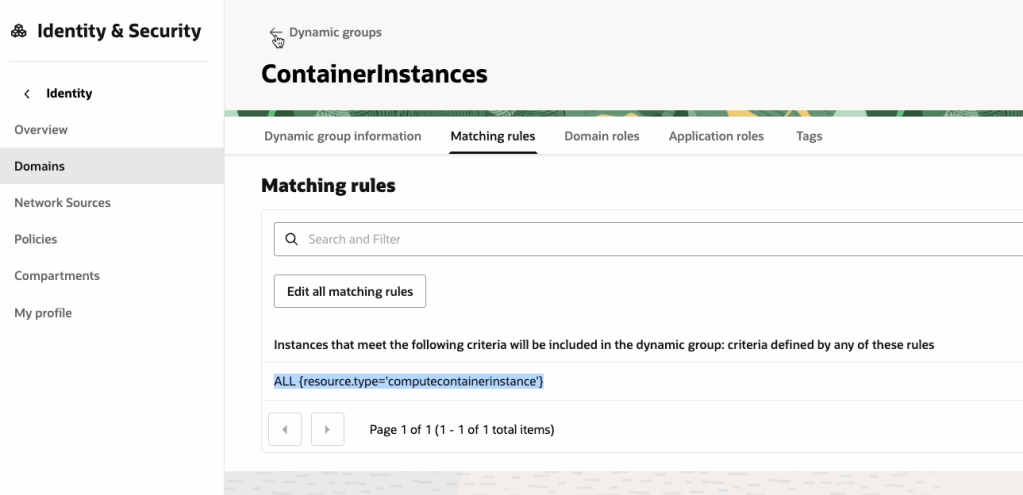
    To do this we will need to create a Dynamic Group within OCI IAM, with the following rule:

    ALL {resource.type='computecontainerinstance'}

    This rule will ensure that every Container Instance within the tenancy is added to the Dynamic Group, which in this example is named “ContainerInstances” – how original! In the real-world, you may want to be more specific and specify a single container instance or Compartment as a member of the Dynamic Group.

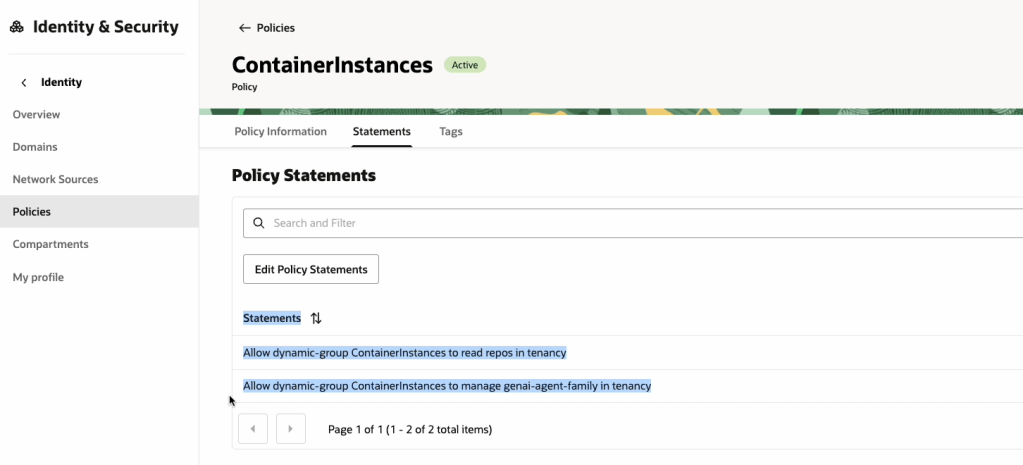
    Now that the Dynamic Group has been created, we need to create a Policy that provides this group (e.g. all container instances within the tenancy) access to pull images from the OCI Container Registry and also grant it access to the OCI Generative AI Agents service, the reason for the latter is that we will use Resource Principal authentication to authenticate the container instance to the service, rather than the API Keys for a specific user account (which is safer as we won’t need to include any keys within the container image! πŸ”‘).

    The policy should have the following two statements:

    Allow dynamic-group ContainerInstances to read repos in tenancy
    Allow dynamic-group ContainerInstances to manage genai-agent-family in tenancy

    Now that we’ve got the Dynamic Group and Policy created, we can move on to Step 2!

    Step 2 – Obtain an auth token and get the tenancy namespace βœ…

    An auth token is required to authenticate to the OCI Container Registry service, which is required when pushing the container image to the registry.

    To create an Auth Token, do the following:

    Make sure that you copy the Auth Token somewhere safe as you will not be able to re-retrieve it after creation ⛔️.

    We now need to get the tenancy namespace, which is required to authenticate to the Container Registry, this can be obtained as follows:

    Now onto Step 3 πŸ‘‡

    Step 3 – Create a Container Image of the Streamlit App βœ…

    The code that I will use for the Streamlit App can be found on GitHub, this is a basic app that connects to an OCI Generative AI Agent and allows a user to ask the agent questions:

    Once you have this, two additional files are required to create the container image:

    requirements.txt, which should contain the following and includes the Python packages required to run the Streamlit app:

    streamlit
    oci

    …and Dockerfile (no file extension required!), which is used to create the container image. This will launch the Streamlit app listening on port 80. Ensure that you update the name of the Python script (in this case OCI-GenAI-Agent-Streamlit.py) to reflect the name of the script you need to run.

    FROM python:3
    WORKDIR /app
    COPY . /app
    RUN pip install --no-cache-dir -r requirements.txt
    EXPOSE 80
    ENTRYPOINT ["streamlit", "run", "OCI-GenAI-Agent-Streamlit.py", "--server.port=80", "--server.address=0.0.0.0"]

    Place the requirement.txt, Dockerfile and Python script into a single directory:

    …and then zip this up.

    Now login to the OCI Console, launch Cloud Shell, upload the zip file and uncompress (this is a quick way to transfer the files).

    We can now create the container image and upload this to the container registry, to do this run the following commands – make sure you run these from the directory that has been un-zipped, which contains the Streamlit app.

    docker login lhr.ocir.io --username namespace/username 

    The namespace was obtained in Step 2, the username is your username (what else could it be πŸ˜‚), for example within my case, this is:

    docker login lhr.ocir.io --username lrdkvqz1i7e6/brendankgriffin@hotmail.com 

    You may also need to update lhr.ocir.io to the correct endpoint for the container registry in your tenancies region, a full list of endpoints can be found here.

    It will then prompt for your password, for this you will need to enter the Auth Token 🎫 obtained in Step 2 (you did save this, right?)

    Here’s a short run-through of this:

    Next step is to build the container image and upload this to the container registry, you will need to run the following commands to do this.

    docker build --tag lhr.ocir.io/lrdkvqz1i7e6/streamlit:latest .

    Make sure that you update the endpoint (lhr.ocir.io) if needed and namespace (lrdkvqz1i7e6). This command will build the container image and tag it with the name streamlit:latest – this command needs to be run from the un-zipped directory that contains the Streamlit app files.

    Once it has built, it can be pushed to the OCI Container Registry using the following command:

    docker push lhr.ocir.io/lrdkvqz1i7e6/streamlit:latest

    Update the namespace and endpoint appropriately.

    Here’s a short walkthrough of this:

    Step 4 – Create a container instance from the container image βœ…

    We are nearly there 🏁, the final step is to create a container instance from the container image that we have just pushed to the container registry.

    To do this, you’ll need a Virtual Cloud Network (VCN) that has a public subnet (so that we can make the instance available over the Internet 🌍), if you don’t have one, you can use the VCN Wizard to quickly do this, as documented here.

    Make sure you have a Security List πŸ“‹ entry that permits access to the public subnet within the VCN on port 80 – in my case from any public IP address, but you may want to restrict this to specific public IP addresses.

    Once you have confirmed that you have a VCN in place, we can go through the process of creating the container instance using the container image that we just created.

    I’ve used the default settings for creating a container instance, in the real-world, you’d need to select an appropriate compute shape (CPU/memory).

    Grab the public IP address assigned to the container instance and open this in your browser of choice, the Streamlit app should open (all being well!).

    You may want to create a DNS entry and point this towards the public IP, to make it easier to access.

    Also in my final disclaimer, for anything but quick and dirty demo’s you should run this over SSL with authentication too! An OCI Load Balancer can be used to do SSL termination and Streamlit provide a useful guide on performing authentication, which can be found here.

    …and that’s it!

  • Crawling a web site using Trafilatura πŸ•·οΈ

    I’ve been building a lot of OCI Generative AI Agents for customer demos recently πŸ€–, one demo that typically resonates well with customers is a RAG agent that uses text scraped from their public website, for example when working with a council this can demonstrate how residents can use a Generative AI Agent to quickly get answers to their questions about council services…….without the hassle of navigating their maze of a website πŸ‘©β€πŸ’».

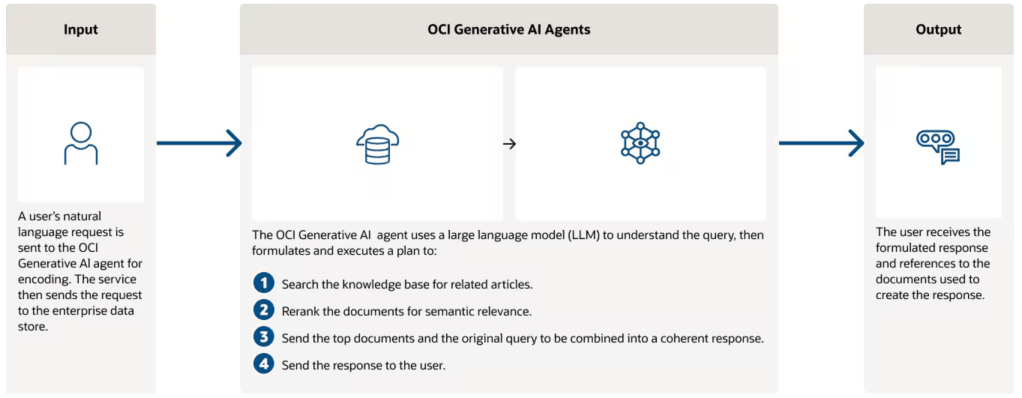
    For reference here’s how an OCI Gen AI Agent works at a high-level.

    In the real world a Gen AI Agent would use internal data that isn’t publicly accessible, however I typically don’t have access to customers data, therefore the approach of crawling their public website works well to showcase the capabilities of a Gen AI Agent and begin a conversation on real-world use-cases that use internal data πŸ“Š.

    I wrote a very hacky Python script to crawl a site and dump the content to a text file which can then be ingested into a Gen AI Agent…….however this is super unreliable as the script is held together with sticking plasters 🩹 and constantly needs to be updated to work around issues experienced when crawling.

    I recently stumbled across a fantastic Python package named Trafilatura which can reliably and easily scrape a site, enabling me to retire my hacky Python script 🐍.

    Trafilatura can be installed using the instructions here (basically pip install trafilatura).

    Once it had been installed, I was able to scrape my own blog (which you are currently reading) using two commands!

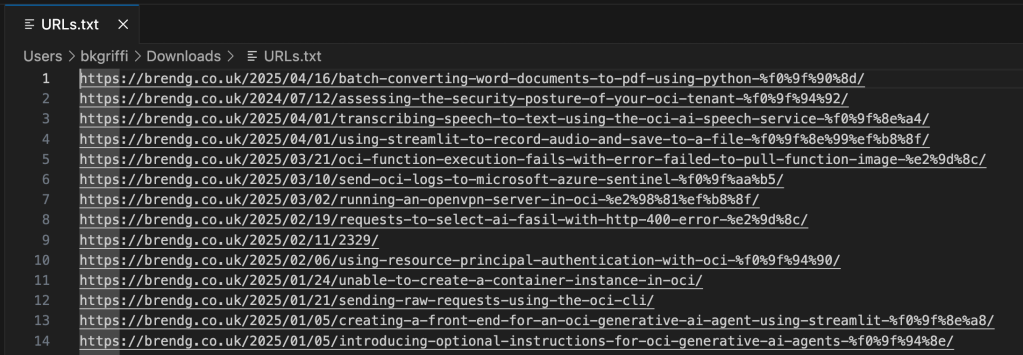
    trafilatura --sitemap "https://brendg.co.uk/" --list >> URLs.txt
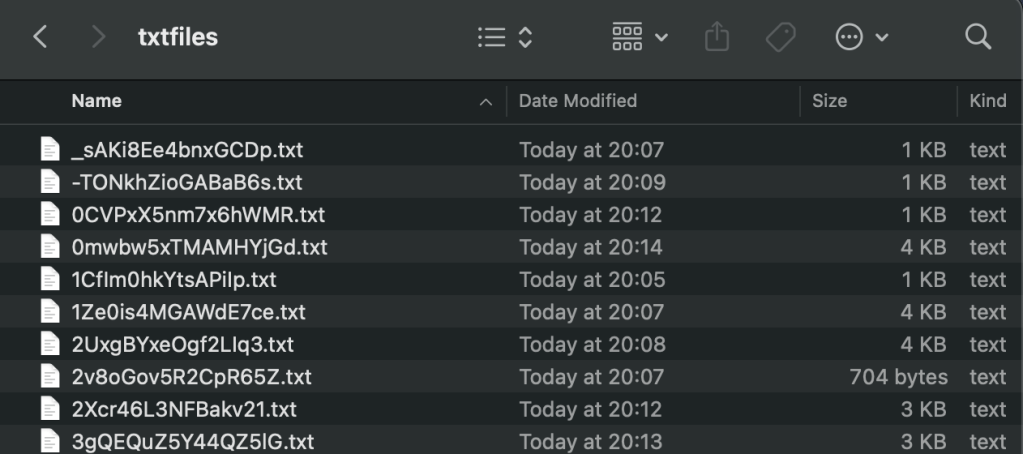
    trafilatura -i URLs.txt -o txtfiles/
    

    The first command grabs the sitemap for https://brendg.co.uk, and writes a list of all URLs found to URL.txt.

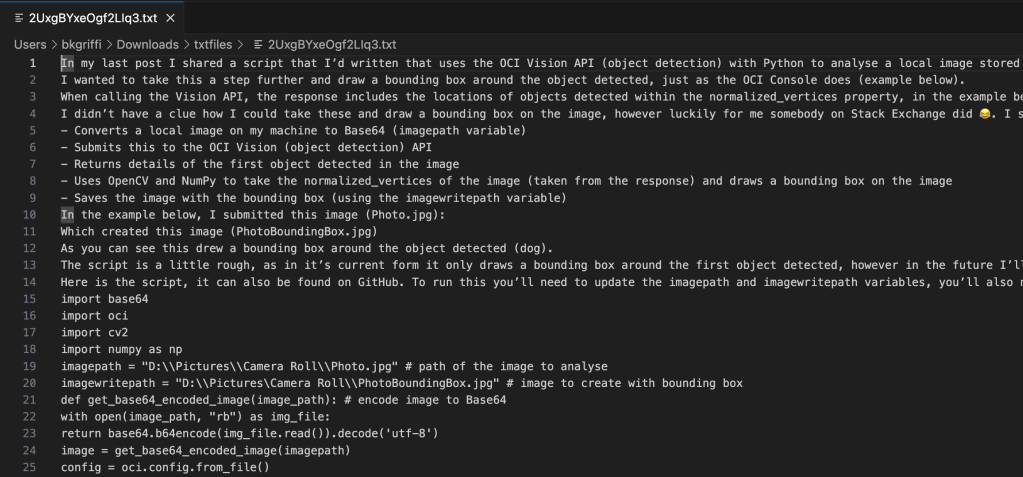
    The second command takes the URL.txt file as input and for each URL within, crawls the page and writes the contents to a text file within the folder txtfiles.

    Below is an example of one of the text files that have been output, you can clearly see the text from the blog post scraped.

    Such a useful tool, which will save me a ton of time ⏱️!

  • Batch Converting Word Documents to PDF using Python πŸ

    I’ve been working on a project deploying an OCI Generative AI Agent πŸ€–, which I’ve previously spoken about here πŸ“Ό.

    Marketing blurbOCI Generative AI Agents is a fully managed service that combines the power of large language models (LLMs) with AI technologies to create intelligent virtual agents that can provide personalized, context-aware, and highly engaging customer experiences.

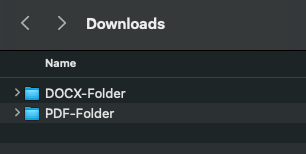
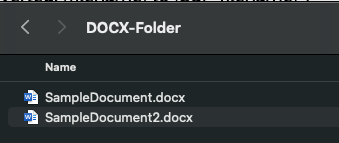
    When creating a Knowledge Base for the agent to use, the only file types that are supported (at present) are PDF and text files. I had a customer that needed to add Word documents (DOCX format) to the agent, rather than converting these manually which would have taken a lifetime πŸ•£, I whipped up a Python script that uses the docx2pdf package – https://pypi.org/project/docx2pdf/ to perform a batch conversion of DOCX files to PDF, one thing to note is that the machine that runs the script needs Word installing locally.

    Here is the script πŸ‘‡

    import os
    import docx2pdf # install using "pip install docx2pdf" prior to running the script
    os.chdir("/Users/bkgriffi/Downloads") # the directory that contains the folders for the source (DOCX) and destination (PDF) files
    def convert_docx_to_pdf(docx_folder, pdf_folder): # function that performs the conversion
        for filename in os.listdir(docx_folder):
            if filename.endswith(".docx"):
                docx_path = os.path.join(docx_folder, filename)
                pdf_filename = filename[:-5] + ".pdf"
                pdf_path = os.path.join(pdf_folder, pdf_filename)
                try:
                    docx2pdf.convert(docx_path, pdf_path)
                    print(f"Converted: {filename} to {pdf_filename}")
                except Exception as e:
                    print(f"Error converting {filename}: {e}")
    convert_docx_to_pdf("DOCX-Folder", "PDF-Folder") # calling the function, with a source folder named DOCX-Folder and a destination folder named PDF-Folder, these folders should reside in the directory specified in line 4
    

    Folder structure πŸ—‚οΈ

    Source DOCX files πŸ“„

    Script Running πŸƒ

    Output PDF files

    Once the documents have been converted to PDF format they could be added to an OCI Storage Bucket and ingested into the OCI Generative AI Agent.

  • Transcribing speech to text using the OCI AI Speech service with Python πŸŽ€

    I’ve been playing around with the OCI AI Speech service recently, one thing I really struggled with was using the AI Speech API to create a transcription job to extract the text from an audio/video file (as I needed to automate the process).

    After much head scratching (…and some help from a colleague), I was able to assemble the following Python script, this provides a function named transcribe, which can be called to submit a transcription job. The following parameters are required:

    • inputfile – The name of the audio/video file to transcribe e.g. recording.mp3
    • bucket – The name of the bucket that contains the inputfile to transcribe (this is also where the JSON output of the transcription job will be stored)
    • compartmentid – OCID of the compartment to run the transcription job in
    • namespace – The Object Storage namespace
    import oci
    
    config = oci.config.from_file()
    
    def transcribe(inputfile,compartmentid,bucket,namespace):
        ai_speech_client = oci.ai_speech.AIServiceSpeechClient(config)
        create_transcription_job_response = ai_speech_client.create_transcription_job(
                create_transcription_job_details=oci.ai_speech.models.CreateTranscriptionJobDetails(
                    compartment_id=compartmentid,
                    input_location=oci.ai_speech.models.ObjectListInlineInputLocation(
                        location_type="OBJECT_LIST_INLINE_INPUT_LOCATION",
                        object_locations=[oci.ai_speech.models.ObjectLocation(
                            namespace_name=namespace,
                            bucket_name=bucket,
                            object_names=[inputfile])]),
                    output_location=oci.ai_speech.models.OutputLocation(
                        namespace_name=namespace,
                        bucket_name=bucket)))
    
    transcribe(inputfile="Name of file to transcribe",compartmentid="OCID of the compartment to run the transcription job in",bucket="Bucket that contains the file to transcribe",namespace="Object storage namespace")
    

    For example:

    transcribe(inputfile=”recording.mp3“,compartmentid=”ocid1.compartment.oc1..aaaaaaaae“,bucket=”Transcription“,namespace=”lrdkvqz1i7f9“)

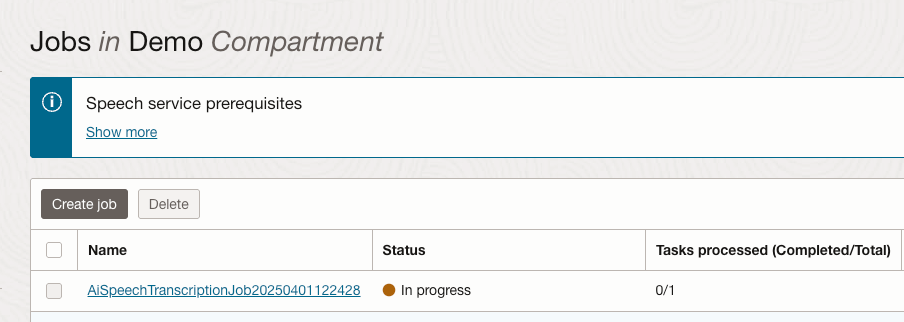
    When this has been executed, the transcription job can be viewed within the OCI Console.

    Once the job completed, the transcription was available to view from within the job (clicking the filename within the Tasks section):

    Here is the transcript in all it’s glory.

    The sample can also be found on GitHub.

  • Creating a front end for the OCI Generative AI Service using Streamlit πŸŽ¨

    I recently shared an example of how to create a basic front-end for an OCI Generative AI Agent using Streamlit, in this post I’m going to share how to do this for the OCI Generative AI Service, this is useful for demo’s when you need to incorporate a specific look and feel, something that’s a little more snazzy than the playground within the OCI Console! πŸ’»

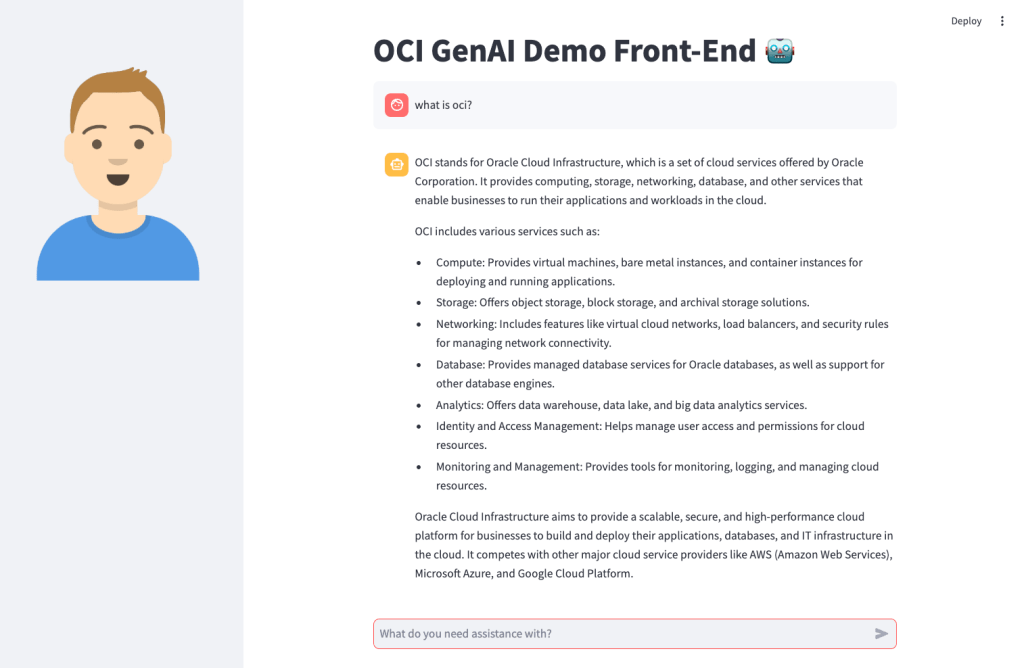
    Here’s what the basic front-end I created looks like:

    Installing Streamlit is a breeze using the single command below.

    pip install streamlit
    

    Once I’d done this, I put together the following Python script to create the web app, this can also be downloaded from GitHub.

    Disclaimer: I’m no developer and this code is a little hacky, but it gets the job done!

    The following variables need to be updated before running the script:

    • st.title β€“ Set’s the title of the page
    • st.set_page_config – Set’s the name and icon to use for the page
    • st.sidebar.image β€“ Configures the image to use in the sidebar
    • config β€“ Set’s the OCI SDK profile to use, further info on this can be found here – https://docs.oracle.com/en-us/iaas/Content/API/Concepts/sdkconfig.htm
    • compartment_id – The compartment to make the request against, a the Generative AI Service doesn’t need to be provisioned, this can be useful for cost tracking and budgeting purposes (as spend is against a specific compartment).
    • endpoint – The endpoint for the region to pass the request to, a full list of the current endpoints can be found here, in my example I’m connecting to the Frankfurt endpoint.
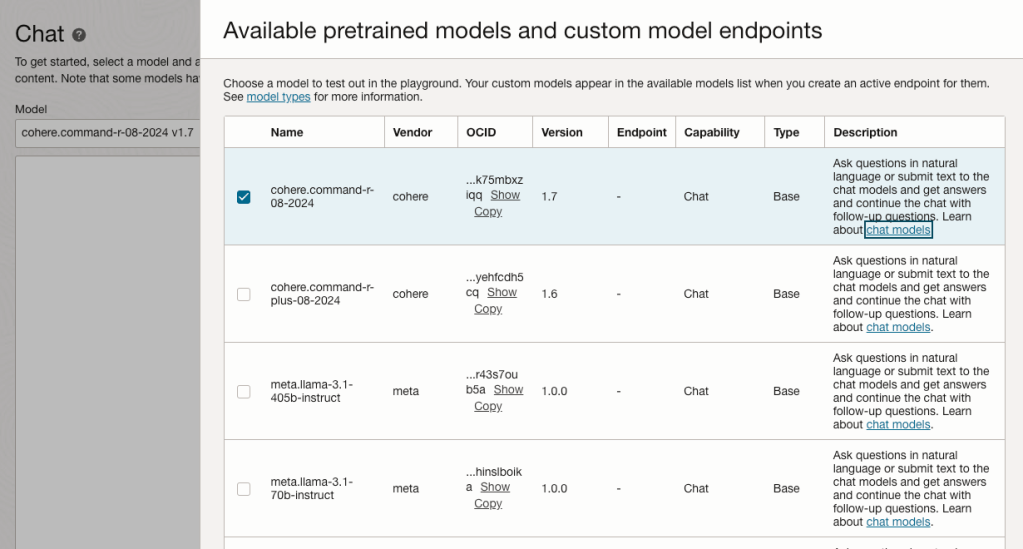
    • model_id – The OCID of the model to call, the eaisest way to obtain this is via the OCI Console: Analytics & AI > Generative AI > Chat > View model details. This will provide a list of the models that are available, simply copy the OCID of the model you’d like to use. Further details on the difference between each of the models can be found here.

    import oci
    import streamlit as st
    
    st.set_page_config(page_title="OCI GenAI Demo Front-End",page_icon="πŸ€–")
    st.title("OCI GenAI Demo Front-End πŸ€–")
    st.sidebar.image("https://brendg.co.uk/wp-content/uploads/2021/05/myavatar.png")
    
    # GenAI Settings
    compartment_id = "Compartment OCID"
    config = oci.config.from_file(profile_name="DEFAULT")
    endpoint = "https://inference.generativeai.eu-frankfurt-1.oci.oraclecloud.com"
    model_id = "Model OCID"
    
    def chat(question):
        generative_ai_inference_client = oci.generative_ai_inference.GenerativeAiInferenceClient(config=config, service_endpoint=endpoint, retry_strategy=oci.retry.NoneRetryStrategy(), timeout=(10,240))
        chat_detail = oci.generative_ai_inference.models.ChatDetails()
        chat_request = oci.generative_ai_inference.models.CohereChatRequest()
        chat_request.message = question 
        chat_request.max_tokens = 1000
        chat_request.temperature = 0
        chat_request.frequency_penalty = 0
        chat_request.top_p = 0.75
        chat_request.top_k = 0
        chat_request.seed = None
        chat_detail.serving_mode = oci.generative_ai_inference.models.OnDemandServingMode(model_id=model_id)
        chat_detail.chat_request = chat_request
        chat_detail.compartment_id = compartment_id
        chat_response = generative_ai_inference_client.chat(chat_detail)
        return chat_response.data.chat_response.text
    
    # Initialize chat history
    if "messages" not in st.session_state:
        st.session_state.messages = []
    
    # Display chat messages from history on app rerun
    for message in st.session_state.messages:
        with st.chat_message(message["role"]):
            st.markdown(message["content"])
    
    # Accept user input
    if prompt := st.chat_input("What do you need assistance with?"):
        # Add user message to chat history
        st.session_state.messages.append({"role": "user", "content": prompt})
        # Display user message in chat message container
        with st.chat_message("user"):
            st.markdown(prompt)
    
        # Display assistant response in chat message container
        with st.chat_message("assistant"):
            response = chat(prompt)
            write_response = st.write(response)
        # Add assistant response to chat history
        st.session_state.messages.append({"role": "assistant", "content": response})
    

    You may also want to tweak the chat_request settings for your specific use-case for Generative AI, my example is tuned for summarisation. Details for what each of the settings does for the Cohere model (which I used), can be found here.

    Once this file has been saved, it’s simple to run with a single command:

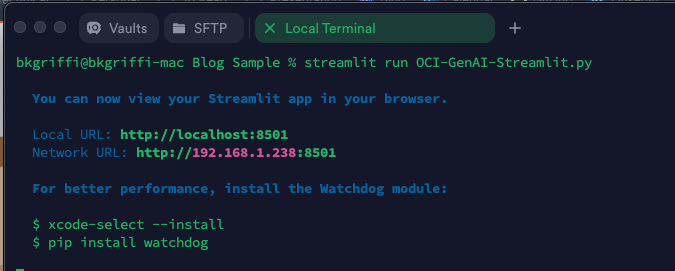
    streamlit run OCI-GenAI-Streamlit.py
    

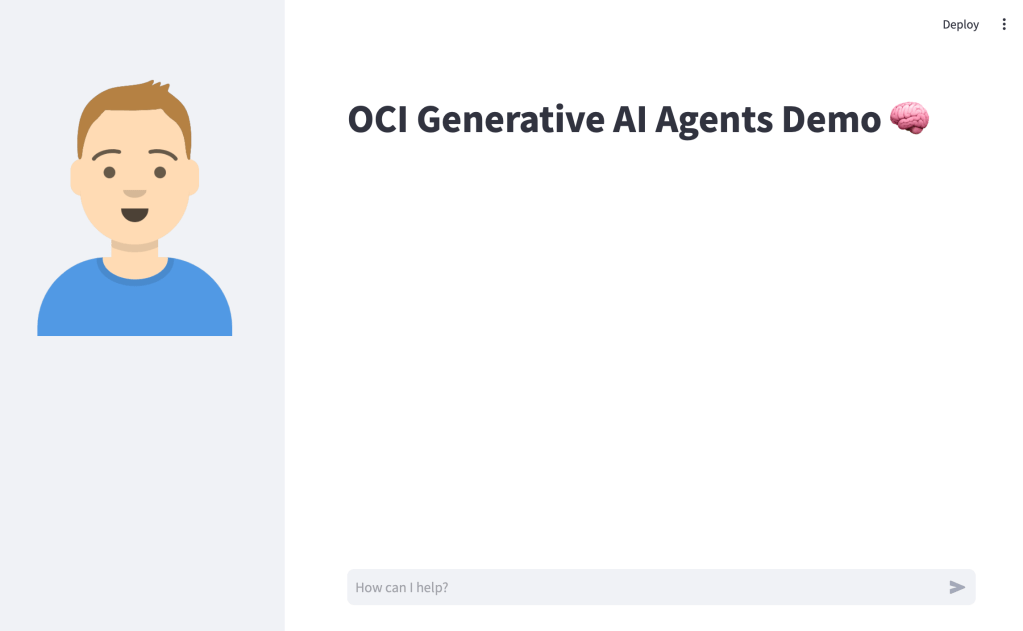
    It will then automatically launch a browser and show the web app in action πŸ–₯️

    This basic example can easily be updated to meet your requirements, the Streamlit documentation is very comprehensive and easy to follow with some useful examples – https://docs.streamlit.io/.

  • Creating a front end for an OCI Generative AI Agent using Streamlit πŸŽ¨

    I stumbled upon an amazing tool recently called Streamlit. Streamlit makes it super-simple to create web apps using Python without any front-end dev experience (which was music to my ears!).

    I had one use-case which was perfect for Streamlit – creating a front end for OCI Generative AI Agents. I’ve built a number of PoCs recently and have used the OCI Console to demonstrate an OCI Generative AI Agent in action, whilst this is functional, it’s not particularly pretty πŸ˜€.

    If you want to know more about OCI Generative AI Agents, be sure to check out this short video that I created that walks through the end-to-end process of creating an agent in less than 10 minutes ⏱️.

    Anyway……back to the main topic. The advantage of using Streamlit is that it enables custom web apps to be created in minutes, which are highly customizable and therefore perfect for PoCs to demonstrate the art of the possible .

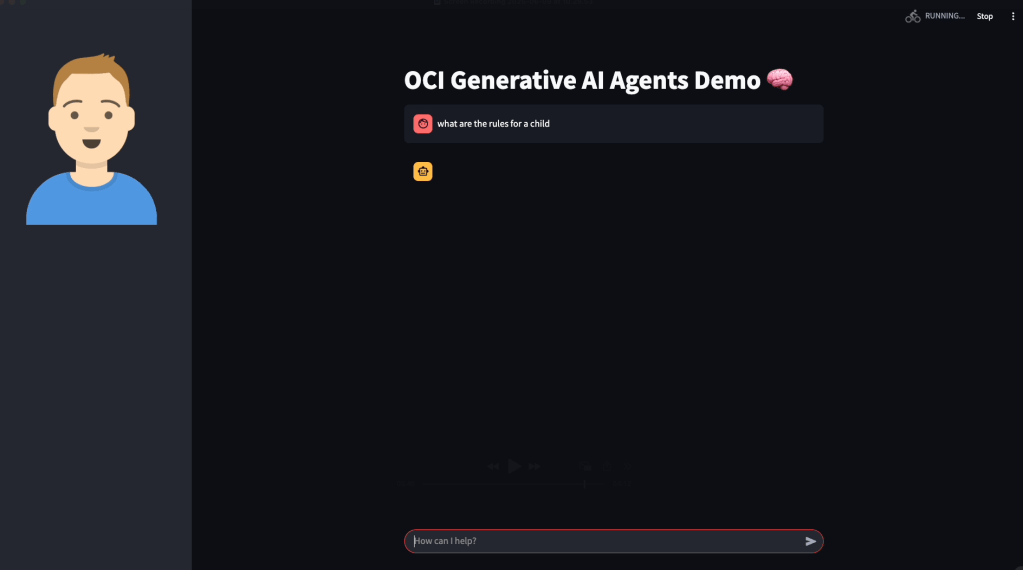
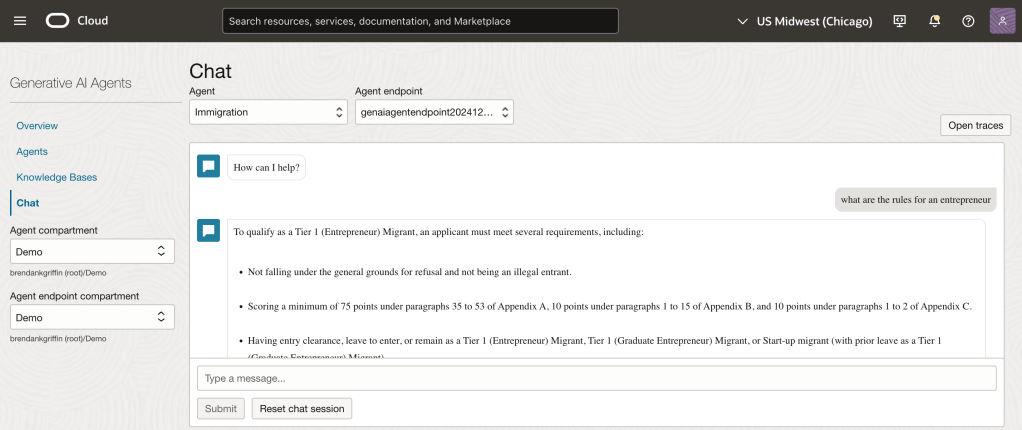
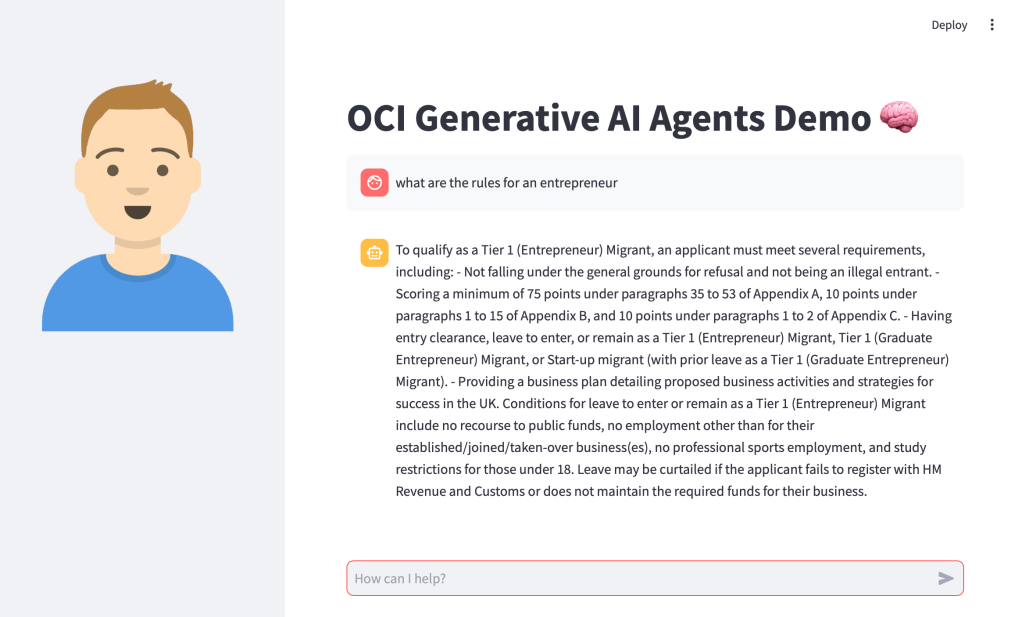
    Before I jump into sharing the code, this is how the end result looked (running locally on my Mac, will also work on Windows too) – using an agent that I developed to help understand UK immigration policy πŸ“„. Here I am asking about the rules for an entrepreneur.

    Installing Streamlit is a breeze using the single command below.

    pip install streamlit
    

    Once I’d done this, I put together the following Python script to create the web app, this can also be downloaded from GitHub.

    Disclaimer: I’m no developer and this code is a little hacky, but it gets the job done!

    The following variables need to be updated before running the script – further info can be found in the code comments:

    • st.title – Set’s the title of the page
    • st.sidebar.image – Configures the image to use in the sidebar
    • config – Set’s the OCI SDK profile to use, further info on this can be found here – https://docs.oracle.com/en-us/iaas/Content/API/Concepts/sdkconfig.htm
    • service_ep – Defines the Generative AI Agent service endpoint to connect to (this varies by region)
    • agent_ep_id – Sets the OCID of the agent to connect to
    import streamlit as st
    import time
    import oci
    
    # Page Title
    st.title("OCI Generative AI Agents Demo 🧠") # Update this with your own title
    
    # Sidebar Image
    st.sidebar.image("https://brendg.co.uk/wp-content/uploads/2021/05/myavatar.png") # Update this with your own image
    
    # OCI GenAI settings
    config = oci.config.from_file(profile_name="DEFAULT") # Update this with your own profile name
    service_ep = "https://agent-runtime.generativeai.us-chicago-1.oci.oraclecloud.com" # Update this with the appropriate endpoint for your region, a list of valid endpoints can be found here - https://docs.oracle.com/en-us/iaas/api/#/en/generative-ai-agents-client/20240531/
    agent_ep_id = "ocid1.genaiagentendpoint.oc1.us-chicago-1.amaaaaaaayvpzvaa7z2imflumr7bbxeguh6y7bpnw2yie4lca2usxrct" # Update this with your own agent endpoint OCID, this can be found within Generative AI Agents > Agents > (Your Agent) > Endpoints > (Your Endpoint) > OCID
    
    # Response Generator
    def response_generator(textinput):
        # Initialize service client with default config file
        generative_ai_agent_runtime_client = oci.generative_ai_agent_runtime.GenerativeAiAgentRuntimeClient(config,service_endpoint=service_ep)
    
        # Create Session
        create_session_response = generative_ai_agent_runtime_client.create_session(
            create_session_details=oci.generative_ai_agent_runtime.models.CreateSessionDetails(
                display_name="USER_Session",
                description="User Session"),
            agent_endpoint_id=agent_ep_id)
    
        sess_id = create_session_response.data.id
    
        response = generative_ai_agent_runtime_client.chat(
            agent_endpoint_id=agent_ep_id,
            chat_details=oci.generative_ai_agent_runtime.models.ChatDetails(
                user_message=textinput,
                session_id=sess_id))
    
        #print(str(response.data))
        response = response.data.message.content.text
        return response
    
    # Initialize chat history
    if "messages" not in st.session_state:
        st.session_state.messages = []
    
    # Display chat messages from history on app rerun
    for message in st.session_state.messages:
        with st.chat_message(message["role"]):
            st.markdown(message["content"])
    
    # Accept user input
    if prompt := st.chat_input("How can I help?"):
        # Add user message to chat history
        st.session_state.messages.append({"role": "user", "content": prompt})
        # Display user message in chat message container
        with st.chat_message("user"):
            st.markdown(prompt)
    
        # Display assistant response in chat message container
        with st.chat_message("assistant"):
            response = response_generator(prompt)
            write_response = st.write(response)
        # Add assistant response to chat history
        st.session_state.messages.append({"role": "assistant", "content": response})
    

    Once this file has been saved, it’s simple to run with a single command:

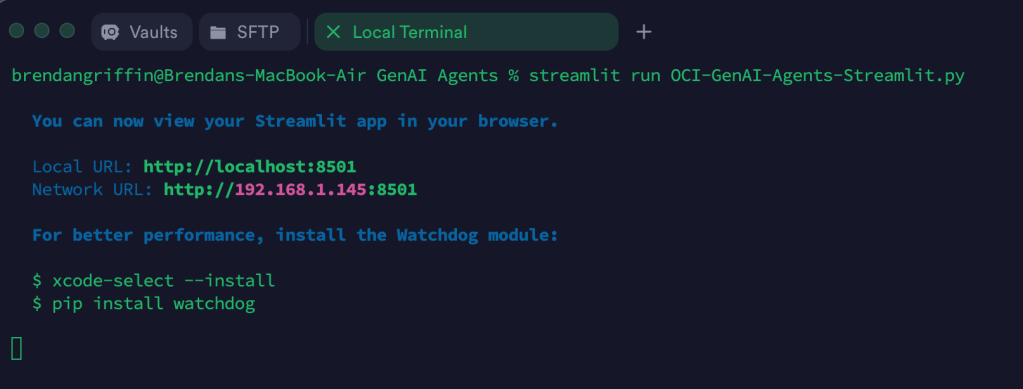
    streamlit run OCI-GenAI-Agents-Streamlit.py
    

    It will then automatically launch a browser and show the web app in action πŸ–₯️

    This basic example can easily be updated to meet your requirements, the Streamlit documentation is very comprehensive and easy to follow with some useful examples – https://docs.streamlit.io/.