
I’ve been working on a project deploying an OCI Generative AI Agent 🤖, which I’ve previously spoken about here 📼.
Marketing blurb – OCI Generative AI Agents is a fully managed service that combines the power of large language models (LLMs) with AI technologies to create intelligent virtual agents that can provide personalized, context-aware, and highly engaging customer experiences.
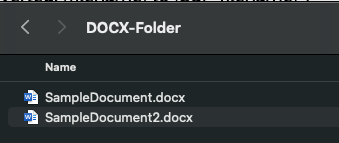
When creating a Knowledge Base for the agent to use, the only file types that are supported (at present) are PDF and text files. I had a customer that needed to add Word documents (DOCX format) to the agent, rather than converting these manually which would have taken a lifetime 🕣, I whipped up a Python script that uses the docx2pdf package – https://pypi.org/project/docx2pdf/ to perform a batch conversion of DOCX files to PDF, one thing to note is that the machine that runs the script needs Word installing locally.
Here is the script 👇
import os
import docx2pdf # install using "pip install docx2pdf" prior to running the script
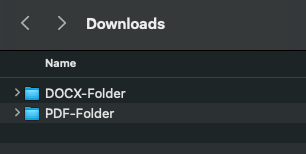
os.chdir("/Users/bkgriffi/Downloads") # the directory that contains the folders for the source (DOCX) and destination (PDF) files
def convert_docx_to_pdf(docx_folder, pdf_folder): # function that performs the conversion
    for filename in os.listdir(docx_folder):
        if filename.endswith(".docx"):
            docx_path = os.path.join(docx_folder, filename)
            pdf_filename = filename[:-5] + ".pdf"
            pdf_path = os.path.join(pdf_folder, pdf_filename)
            try:
                docx2pdf.convert(docx_path, pdf_path)
                print(f"Converted: {filename} to {pdf_filename}")
            except Exception as e:
                print(f"Error converting {filename}: {e}")
convert_docx_to_pdf("DOCX-Folder", "PDF-Folder") # calling the function, with a source folder named DOCX-Folder and a destination folder named PDF-Folder, these folders should reside in the directory specified in line 4
Folder structure 🗂️
Source DOCX files 📄
Script Running 🏃

Output PDF files

Once the documents have been converted to PDF format they could be added to an OCI Storage Bucket and ingested into the OCI Generative AI Agent.
 Brendan's Tech Ramblings
Leave a comment