
When connecting to OCI services in using the SDKs there are four options for authentication 🔐:
- API Key
- Session Token
- Instance Principal
- Resoure Principal
Each of these is covered in detail within the OCI SDK Authentication Methods documentation 📕.
I had a situation recently where I wanted to use Resource Principal authentication to authenticate a Container Instance to an OCI Generative AI Agent, the container was running a Python-based front end for an agent that I had created, however rather than using an API Key to authenticate as a specific user account to the Generative AI Agent service, I wanted to authenticate as the actual Container Instance itself.
Doing this meant that I didn’t need to store a private key and config file (of the user account) on the Container Instance, which could be viewed as a security risk.
There are three steps required to configure Resource Principal authentication which I have explained below, one thing to note is that this approach can be adapted for authenticating to other OCI services.
Step 1 – Create a Dynamic Group that includes the Container Instance 🫙
This defines the resource that will be connecting from (the Container Instance) to the Generative AI Agent. To create the Dynamic Group, I did the following within the OCI Console – I navigated to:
Identity & Security > Domains > (My Domain) > Dynamic groups > Create dynamic group.
I then created a group named Container-Instances with the following rule:
ALL {resource.type=’computecontainerinstance’}
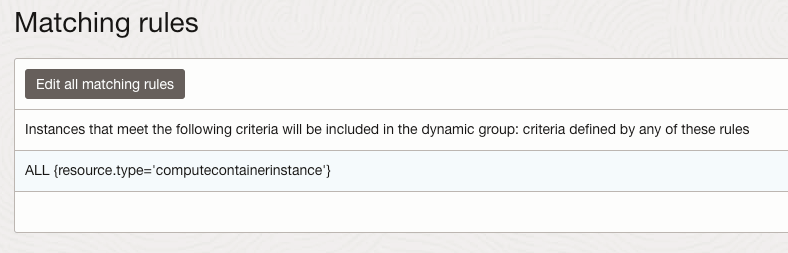
This Dynamic Group contains every Container Instance within my tenant, I could have been more granular and specified an individual Container Instance.
For further details on how to create Dynamic Groups be sure to check out the official documentation.
Step 2 – Create a Policy that provides members of the Dynamic Group with access to the Generative AI Agents service 📄
The policy grants permissions to the Dynamic Group created above so that members of this group are able to connect to the Generative AI Agent service, to create the policy I did the following within the OCI Console:
Navigated to – Identity & Security > Domains > Policies > Create Policy
I then created a policy with the following statement:
Allow dynamic-group Container-Instances to manage genai-agent-family in tenancy
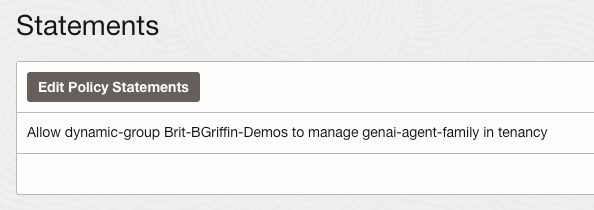
This provides the Dynamic Group named Container-Instances (created in Step 1) the desired access to the Generative AI Agent service – each OCI service has specific resource types that can be used within policies, the full policy reference for the Generative AI Agent service can be found here.
Step 3 – Update the Python code to authenticate to the Generative AI Agent service using the identify of the Container Instance (Resource Principal) 🐍
To update the Python script that connects to the Generative AI Agent so that it uses Resource Principal rather than API Key authentication, I updated the following lines of code from this:
config = oci.config.from_file("config")
service_ep = "https://agent-runtime.generativeai.uk-london-1.oci.oraclecloud.com"
agent_ep_id = "OCID"

generative_ai_agent_runtime_client = oci.generative_ai_agent_runtime.GenerativeAiAgentRuntimeClient(config,service_endpoint=service_ep)
To this:
rps = oci.auth.signers.get_resource_principals_signer()
service_ep = "https://agent-runtime.generativeai.uk-london-1.oci.oraclecloud.com"
agent_ep_id = "OCID"

generative_ai_agent_runtime_client = oci.generative_ai_agent_runtime.GenerativeAiAgentRuntimeClient(config={},signer=rps,service_endpoint=service_ep)
The two major changes are:
- Using “oci.auth.signers.get_resource_principals_signer()” rather than loading a config file with “config = oci.config.from_file(“config”)”
- When connecting to the service, using “config={},signer=rps,service_endpoint=service_ep” (key bits in bold) rather than “config,service_endpoint=service_ep“
As mentioned earlier the approach that I’ve covered above an be adapted to work with other OCI services.


Leave a reply to Publishing a Streamlit App as a Container Instance in OCI ⛴️ – Brendan's Tech Ramblings Cancel reply