
The OCI CLI is a fantastic tool that makes administering OCI a breeze! But with some many difference commands and parameters it can sometimes be a little unwieldy 😩.
I recently discovered that the OCI ClI has an interactive mode, which greatly simplifies using it – for me this has meant less time with my head stuck in the documentation and more time actually getting things done!
Using interactive mode is a breeze, you simply launch it using oci -i.
Once you’ve done this, start typing the name of the command you wish to use, and it will provide auto-complete suggestions. In the example below I typed ai, it then suggested the relevant AI services in OCI that I can interact with.

If I then select Vision for example, it provides a full list of all the actions available.
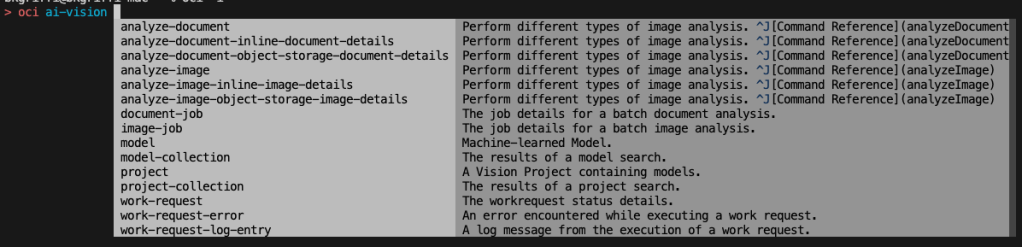
If I wanted to use OCI AI Vision to analyse an image stored within object storage, I select the appropriate command (analyze-image-object-storage-image-details).
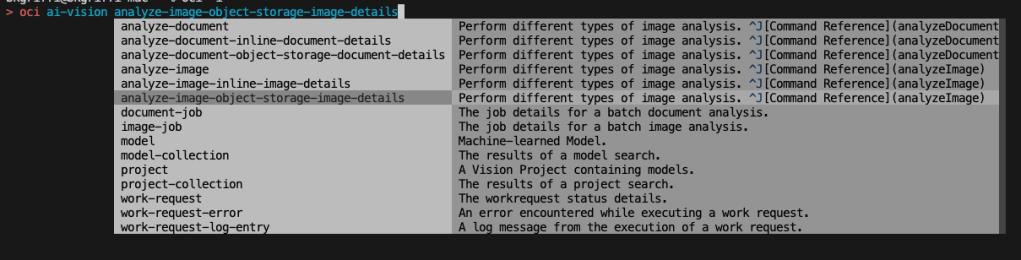
It then provides details of all the parameters (those that are required are denoted by a *). I can then build up my command and run this…..how cool!


Hopefully this helps you to save as much time as it did me 😎.

 Brendan's Tech Ramblings
Leave a reply to pealsabdallah Cancel reply