
I’ve previously wrote about how I use OCI Bastion and Site to Site VPN to connect to my VM instances running within OCI that do not have a public IP address. There is also a third option, which I (rather embarrassingly) only recently found out about.
It’s possible to use the OCI Cloud Shell (which runs within a web browser) to connect via SSH to a VM instance that is attached to a private subnet (therefore has no public IP address).
To do this, launch Cloud Shell from within the OCI Console

Select the Network drop-down menu and then Ephemeral private network setup
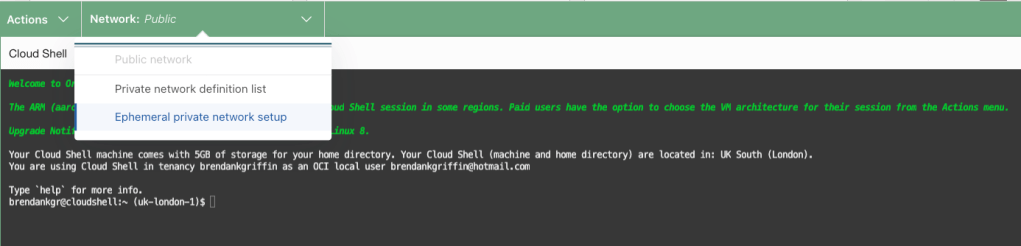
Select the VCN and Subnet to connect to (the one that contains the instance you wish to connect to) and then click Use as active network


Wait a minute or two! When the network status updates to Ephemeral the Cloud Shell is connected directly to the VCN and subnet selected.

You can SSH into a VM instance within the subnet using it’s private IP address.


Leave a reply to Terraform Destroy 🗑️, 409 Conflict Error when deleting an OCI Subnet 🛜 – Brendan's Tech Ramblings Cancel reply