
This is probably the most boring and useless blog post that I’ve ever written – however it’s more for my future self than anybody else 😆.
A few months ago, I wrote a Python script that scraped my local council’s website for the bin🗑️ (garbage for any Americans reading this) collection schedule, I never seem to know when my bins will be collected and I’m too lazy to check this manually so thought I’d write a script to automate it. The original post can be found here and the Python script here.
I run this each week to check the schedule (as it changes often), below is the output of the script in all its glory:

I absolutely love overcomplicating things when it comes to tech, plus I’m always eager to learn new things, so the next step for me was to write a script that takes this output and creates an entry in my calendar to save me having to run the script manually, I planned to run this using a weekly Cron job on my Raspberry Pi….anyway, I’m jumping ahead of myself here!
I plan to use the Google Calendar API to do this, the one challenge I have is that the dates returned from my script are in a different format to that expected by the API.
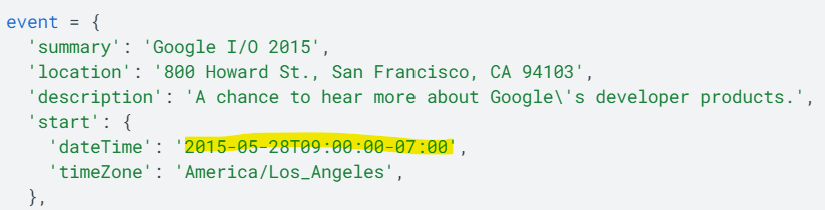
I needed a way to convert the these into the format expected by the Google Calendar API…the Python datetime library and the strptime method to the rescue!
I wrote the following, which takes the output from the variable I create for each bin type within the original BinDateChecker.py script (Black, Blue and Brown) and converts this into a datetime object.
from datetime import datetime
bluebindate = "Wednesday 16th Nov 2022" # Manually specifying the date string for testing using the format returned by the BinDateChecker.py Python script
# Remove all instances of st, nd, rd and th as datetime.strptime cannot deal with these (I'm sure there's a more elegant approach!)
bluebindate = bluebindate.replace("st","")
bluebindate = bluebindate.replace("nd","")
bluebindate = bluebindate.replace("rd","")
bluebindate = bluebindate.replace("th","")
# Call datetime.strptime passing the format I'm using day name / date / month name / year, a full reference can be found here - https://docs.python.org/3/library/datetime.html#strftime-strptime-behavior
bluebindate = datetime.strptime(bluebindate, '%A %d %b %Y')
print(bluebindate)
Here is the script, along with the date outputted in the desired format.

Now for the real fun…figuring out the Google Calendar API!


 Brendan's Tech Ramblings
Leave a reply to benjaminloison Cancel reply