
I’ve been working with a customer that’s automation tool of choice is PowerShell…..the good news for them was that OCI provides PowerShell modules!
This means that customers can in theory do everything in PowerShell that they can with the OCI CLI.
The following guide steps through the process of setting up the PowerShell modules for OCI – OCI Modules for PowerShell
Once I’d got this setup (which wasn’t very painful), one of the first things that I helped them to automate is producing a list of all of the VM instances running within their tenancy, I’ve included the code for this below:
# Get all VMs
$Compartments = Get-OCIIdentityCompartmentsList -CompartmentId ocid1.tenancy.oc1.. -CompartmentIdInSubtree $true -LifecycleState Active

Foreach ($Compartment in $Compartments)
{
Write-Host "Compartment Name:" $Compartment.Name -ForegroundColor Green
$Instances = Get-OCIComputeInstancesList -CompartmentId $Compartment.Id
Foreach ($Instance in $Instances)
    {
        Write-Host "-Instance:" $Instance.DisplayName -ForegroundColor White
    }
}
This loops through every Compartment from the root Compartment downwards and lists the VM instances within each of these Compartments.
The only thing that needs to be updated prior to running this script is the OCID of the root compartment (CompartmentId parameter).
Here is the output from my tenancy:
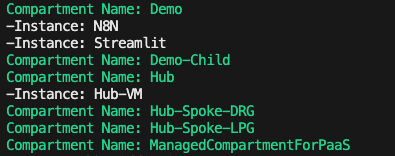
You can see all of the Compartments within the tenancy and the 3 x VM instances that I have:
- N8N
- Streamlit
- Hub-VM
 Brendan's Tech Ramblings
Leave a comment