
I watch a lot of content on YouTube (particularly John Savill’s amazing Azure channel) for channels that have been around for a while it’s difficult to navigate through the back catalogue to identify videos to watch 🔎.
I recently had the brainwave of writing a script, that can connect to a YouTube channel and write out a list of all videos and their URLs to a CSV file to help me out here…luckily for me YouTube has a rich API that I could use to do this.

You will need a key to access the YouTube API, here is a short video I put together that walks through the process of creating one:
Below is the Python script that I put together (with comments) that uses the Requests module to do just this! You will also need to update the key, channel and csv variables prior to running the script.
import requests

# Set the key used to query the YouTube API
key = "KEY"

# Specify the name of the channel to query - remember to drop the leading @ sign
channel = "NTFAQGuy" # the very reason that I wrote this script!

# Set the location of the CSV file to write to
csv = "C:\\videos.csv" # Windows path

try:
    # Retrieve the channel id from the username (channel variable) - which is required to query the videos contained within a channel
    url = "https://youtube.googleapis.com/youtube/v3/channels?forUsername=" + channel + "&key=" + key
    request = requests.get(url)
    channelid = request.json()["items"][0]["id"]

except:
    # if this fails, perform a channel search instead. Further documentation on this: https://developers.google.com/youtube/v3/guides/working_with_channel_ids
    url = "https://youtube.googleapis.com/youtube/v3/search?q=" + channel + "&type=channel" + "&key=" + key
    request = requests.get(url)
    channelid = request.json()["items"][0]["id"]["channelId"]

# Create the playlist id (which is based on the channel id) of the uploads playlist (which contains all videos within the channel) - uses the approach documented at https://stackoverflow.com/questions/55014224/how-can-i-list-the-uploads-from-a-youtube-channel
playlistid = list(channelid)
playlistid[1] = "U"
playlistid = "".join(playlistid)

# Query the uploads playlist (playlistid) for all videos and writes the video title and URL to a CSV file (file path held in CSV variable)
lastpage = "false"
nextPageToken = ""

while lastpage:
    videosUrl = "https://www.googleapis.com/youtube/v3/playlistItems?part=snippet%2CcontentDetails&playlistId=" + playlistid + "&pageToken=" + nextPageToken + "&maxResults=50" + "&fields=items(contentDetails(videoId%2CvideoPublishedAt)%2Csnippet(publishedAt%2Ctitle))%2CnextPageToken%2CpageInfo%2CprevPageToken%2CtokenPagination&key=" + key
    request = requests.get(videosUrl)
    videos = request.json()
    for video in videos["items"]:
        f = open(csv,"a")
        f.write(video["snippet"]["title"].replace(",","") + "," + "https://www.youtube.com/watch?v=" + video["contentDetails"]["videoId"] + "\n")
        f.close()
    try: # I'm sure there are far more elegant ways of identifying the last page of results!
        nextPageToken = videos["nextPageToken"]
    except:
        break
Here is what the output looks like:
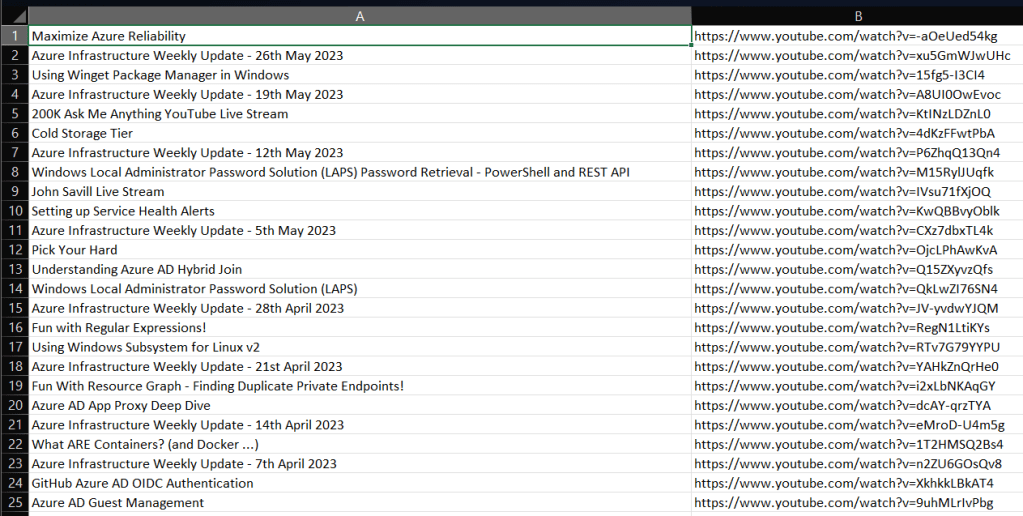
The script can also be found on GitHub.
 Brendan's Tech Ramblings
Leave a comment