
One of my hobbies is collecting video games, specifically retro games from the 80s and 90s.
My collection has grown over the years and it’s difficult for me to track what I own. On more than one occasion I’ve bought a game, later to realise that I already owned it 🤦♂️. Over the holidays I had a brainwave……..why don’t I keep a list of the games that I have!
Rather than getting out a pen and paper to document my game collection (which would have been far simpler) I decided to use this as an excuse to play around with Azure Cognitive Services, specifically Computer Vision.
My plan was to take photos of my collection, pass these photos to Azure Cognitive Services to extract the text from the photos and then write this to a file, which I’ll then eventually put into a database or Excel (probably the latter 😀).
I took a photo of some of my games (PS3 so not exactly retro!) and then set about writing a Python script that used the REST API endpoint for the Computer Vision service to submit the photo and extract any detected text.

Below is the script in all its glory, it does the following:
- Submits the photo to the REST API endpoint for Computer Vision.
- Stores the results URL returned by the API.
- Polls the results URL until the analysis has completed.
- Prints out each piece of text detected.
- Writes each piece of text to a text file, but only if the text returned is longer than 5 characters – this is to filter out other text detected, such as PS3 or the game ID, not exactly scientific but seems to do the trick! Hopefully, I don’t have any games with less than 5 characters in their title.
import requests
import time
from io import BytesIO
import json

# Sets the endpoint and key for Azure Cognitive Services
url = "https://RESOURCENAME.cognitiveservices.azure.com/vision/v3.2/read/analyze"
key = "KEY"

# Sets the location of the photo to analyze and opens the file
image_path = "D:/Games.png"
image_data = open(image_path, "rb").read()

# Submits the photo ("D:/Games.png") to the REST API endpoint for Computer Vision
headers = {"Ocp-Apim-Subscription-Key" : key,'Content-Type': 'application/octet-stream'}
r = requests.post(url,headers = headers, data=image_data)

# Retrieves the results URL from the response
operation_url = r.headers["Operation-Location"]

# The recognized text isn't immediately available, so poll the results URL and wait for completion.
analysis = {}
poll = True
while (poll):
    response_final = requests.get(r.headers["Operation-Location"], headers=headers)
    analysis = response_final.json()

    print(json.dumps(analysis, indent=4))

    time.sleep(1)
    if ("analyzeResult" in analysis):
        poll = False
    if ("status" in analysis and analysis['status'] == 'failed'):
        poll = False

# Store the returned text in a list "lines" also print out each line to the console
lines = []
for line in analysis["analyzeResult"]["readResults"][0]["lines"]:
    print(line["text"])
    lines.append(line["text"])

# Create a new text file "games.txt" and write the text to the file
gameslist = open("D:/games.txt", "a")
for line in lines:
    if len(line) > 5: # This is to filter out other text detected, such as PS3 or the game ID, not exactly scientific but seems to do the trick! Hopefully I don't have any games with less than 5 characters in their name
        print(line)
        gameslist.write(line + "\n" )
gameslist.close()
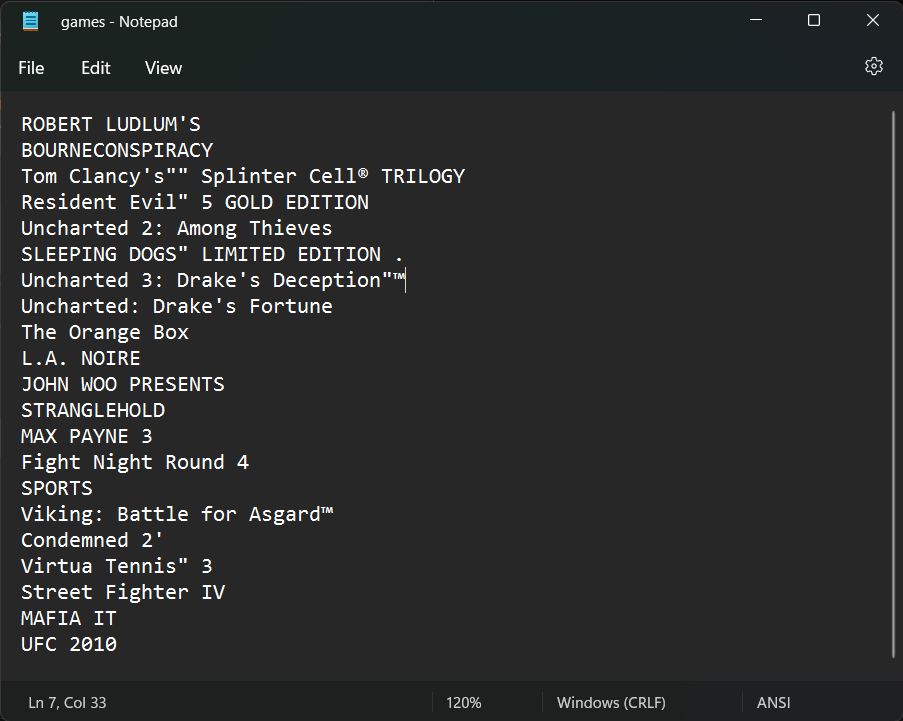
Here’s the text file that it produced, it’s not perfect as ROBERT LUDLUM’S and BOURNECONSPIRACY is actually one and the same rather than being separate games. It will be interesting see how the Azure Cognitive Services (and my script!) holds up to analyzing games from other systems. My earliest being an Amstrad CPC 6128 (my very first computer).


Leave a comment